Sunday, October 26, 2014

JMS - Point-to-Point messaging example using ActiveMQ and Maven

jms logo
A point-to-point (PTP) product or application is built on the concept of message queues, senders and receivers. Each message is addressed to a specific queue and receiving clients extract messages from the queues established to hold their messages. Queues retain all messages sent to them until the messages are consumed. The following post introduces the basic concepts of JMS point-to-point messaging and illustrates them with a code sample using ActiveMQ and Maven.

Point-to-Point Messaging

point-to-point messaging
PTP messaging has the following characteristics:
  • Each message has only one consumer.
  • A sender and a receiver of a message have no timing dependencies. The receiver can fetch the message whether or not it was running when the client sent the message.
  • The receiver acknowledges the successful processing of a message.

ActiveMQ Example

Let's illustrate the above characteristics by creating a message producer that sends a message containing a first and last name to a queue. In turn a message consumer will read the message and transform it into a greeting. The code is very similar to the JMS Hello World example but contains a few key differences explained below.

Tools used:
  • ActiveMQ 5.10
  • Maven 3

The code is built and run using Maven. Specified below is the Maven POM file which contains the needed dependencies for Logback, JUnit and ActiveMQ.
<?xml version="1.0" encoding="UTF-8"?>
<project xmlns="http://maven.apache.org/POM/4.0.0" xmlns:xsi="http://www.w3.org/2001/XMLSchema-instance"
xsi:schemaLocation="http://maven.apache.org/POM/4.0.0 http://maven.apache.org/xsd/maven-4.0.0.xsd">
<modelVersion>4.0.0</modelVersion>

<groupId>info.source4code</groupId>
<artifactId>jms-activemq-point-to-point</artifactId>
<version>1.0</version>
<packaging>jar</packaging>

<name>JMS - Point-to-Point messaging using ActiveMQ</name>
<url>http://www.source4code.info/2014/10/jms-point-to-point-messaging-example-activemq-maven.html</url>

<properties>
<project.build.sourceEncoding>UTF-8</project.build.sourceEncoding>
<java.version>1.6</java.version>

<logback.version>1.1.2</logback.version>
<slf4j.version>1.7.7</slf4j.version>
<junit.version>4.12-beta-2</junit.version>
<activemq.version>5.10.0</activemq.version>

<maven-compiler-plugin.version>3.1</maven-compiler-plugin.version>
</properties>

<dependencies>
<!-- Logging -->
<dependency>
<groupId>ch.qos.logback</groupId>
<artifactId>logback-classic</artifactId>
<version>${logback.version}</version>
</dependency>
<dependency>
<groupId>org.slf4j</groupId>
<artifactId>slf4j-api</artifactId>
<version>${slf4j.version}</version>
</dependency>
<!-- JUnit -->
<dependency>
<groupId>junit</groupId>
<artifactId>junit</artifactId>
<version>${junit.version}</version>
<scope>test</scope>
</dependency>
<!-- ActiveMQ -->
<dependency>
<groupId>org.apache.activemq</groupId>
<artifactId>activemq-all</artifactId>
<version>${activemq.version}</version>
</dependency>
</dependencies>

<build>
<plugins>
<plugin>
<groupId>org.apache.maven.plugins</groupId>
<artifactId>maven-compiler-plugin</artifactId>
<version>${maven-compiler-plugin.version}</version>
<configuration>
<source>${java.version}</source>
<target>${java.version}</target>
</configuration>
</plugin>
</plugins>
</build>
</project>

The Producer class contains a constructor which creates a message producer and needed connection and session objects. The sendName() operation takes as input a first and last name which are set on a TextMessage which in turn is sent to the queue set on the message producer.
package info.source4code.jms.activemq.ptp;

import javax.jms.Connection;
import javax.jms.ConnectionFactory;
import javax.jms.JMSException;
import javax.jms.MessageProducer;
import javax.jms.Queue;
import javax.jms.Session;
import javax.jms.TextMessage;

import org.apache.activemq.ActiveMQConnection;
import org.apache.activemq.ActiveMQConnectionFactory;
import org.slf4j.Logger;
import org.slf4j.LoggerFactory;

public class Producer {

private static final Logger LOGGER = LoggerFactory
.getLogger(Producer.class);

private String clientId;
private Connection connection;
private Session session;
private MessageProducer messageProducer;

public void create(String clientId, String queueName) throws JMSException {
this.clientId = clientId;

// create a Connection Factory
ConnectionFactory connectionFactory = new ActiveMQConnectionFactory(
ActiveMQConnection.DEFAULT_BROKER_URL);

// create a Connection
connection = connectionFactory.createConnection();
connection.setClientID(clientId);

// create a Session
session = connection.createSession(false, Session.AUTO_ACKNOWLEDGE);

// create the Queue to which messages will be sent
Queue queue = session.createQueue(queueName);

// create a MessageProducer for sending messages
messageProducer = session.createProducer(queue);
}

public void closeConnection() throws JMSException {
connection.close();
}

public void sendName(String firstName, String lastName) throws JMSException {
String text = firstName + " " + lastName;

// create a JMS TextMessage
TextMessage textMessage = session.createTextMessage(text);

// send the message to the queue destination
messageProducer.send(textMessage);

LOGGER.debug(clientId + ": sent message with text='{}'", text);
}
}

The Consumer class contains a constructor which creates a message consumer and needed connection and session objects. A key difference with the JMS Hello World example is that the Session object is created with the Session.CLIENT_ACKNOWLEDGE parameter which requires a client to explicitly acknowledge a consumed message by calling the message's acknowledge() method.

The getGreeting() operation reads a message from the queue and creates a greeting which is returned. Aside from the timeout parameter an additional acknowledge parameter is passed which is used to determine whether the received message should be acknowledged or not.
package info.source4code.jms.activemq.ptp;

import javax.jms.Connection;
import javax.jms.ConnectionFactory;
import javax.jms.JMSException;
import javax.jms.Message;
import javax.jms.MessageConsumer;
import javax.jms.Queue;
import javax.jms.Session;
import javax.jms.TextMessage;

import org.apache.activemq.ActiveMQConnection;
import org.apache.activemq.ActiveMQConnectionFactory;
import org.slf4j.Logger;
import org.slf4j.LoggerFactory;

public class Consumer {

private static final Logger LOGGER = LoggerFactory
.getLogger(Consumer.class);

private static String NO_GREETING = "no greeting";

private String clientId;
private Connection connection;
private Session session;
private MessageConsumer messageConsumer;

public void create(String clientId, String queueName) throws JMSException {
this.clientId = clientId;

// create a Connection Factory
ConnectionFactory connectionFactory = new ActiveMQConnectionFactory(
ActiveMQConnection.DEFAULT_BROKER_URL);

// create a Connection
connection = connectionFactory.createConnection();
connection.setClientID(clientId);

// create a Session
session = connection.createSession(false, Session.CLIENT_ACKNOWLEDGE);

// create the Queue from which messages will be received
Queue queue = session.createQueue(queueName);

// create a MessageConsumer for receiving messages
messageConsumer = session.createConsumer(queue);

// start the connection in order to receive messages
connection.start();
}

public void closeConnection() throws JMSException {
connection.close();
}

public String getGreeting(int timeout, boolean acknowledge)
throws JMSException {

String greeting = NO_GREETING;

// read a message from the queue destination
Message message = messageConsumer.receive(timeout);

// check if a message was received
if (message != null) {
// cast the message to the correct type
TextMessage textMessage = (TextMessage) message;

// retrieve the message content
String text = textMessage.getText();
LOGGER.debug(clientId + ": received message with text='{}'", text);

if (acknowledge) {
// acknowledge the successful processing of the message
message.acknowledge();
LOGGER.debug(clientId + ": message acknowledged");
} else {
LOGGER.debug(clientId + ": message not acknowledged");
}

// create greeting
greeting = "Hello " + text + "!";
} else {
LOGGER.debug(clientId + ": no message received");
}

LOGGER.info("greeting={}", greeting);
return greeting;
}
}

The below JUnit test class will be used to illustrate the PTP messaging characteristics mentioned at the beginning of this post. The testGreeting() test case verifies the correct working of the getGreeting() method of the Consumer class.

The testOnlyOneConsumer() test case will verify that a message is read by only one consumer. The first consumer will receive the greeting and the second consumer will receive nothing.

The testNoTimingDependencies() test case illustrates that the consumer can successfully receive a message even if that consumer is created after the message was sent.

Finally the testAcknowledgeProcessing() test case will verify that a message is not removed by the JMS provider in case it was not acknowledged by the consumer. In order to simulate this we first call the getGreeting() method with the acknowledge parameter set to false. Then the getGreeting() method is called a second time and as the first call did not acknowledge the message it is still available on the queue.
package info.source4code.jms.activemq.ptp;

import static org.junit.Assert.assertEquals;
import static org.junit.Assert.fail;

import javax.jms.JMSException;
import javax.naming.NamingException;

import org.junit.AfterClass;
import org.junit.BeforeClass;
import org.junit.Test;

public class ConsumerTest {

private static Producer producerPointToPoint, producerOnlyOneConsumer,
producerNoTimingDependencies, producerAcknowledgeProcessing;
private static Consumer consumerPointToPoint, consumer1OnlyOneConsumer,
consumer2OnlyOneConsumer, consumerNoTimingDependencies,
consumer1AcknowledgeProcessing, consumer2AcknowledgeProcessing;

@BeforeClass
public static void setUpBeforeClass() throws JMSException, NamingException {
producerPointToPoint = new Producer();
producerPointToPoint.create("producer-pointtopoint", "pointtopoint.q");

producerOnlyOneConsumer = new Producer();
producerOnlyOneConsumer.create("producer-onlyoneconsumer",
"onlyoneconsumer.q");

producerNoTimingDependencies = new Producer();
producerNoTimingDependencies.create("producer-notimingdependencies",
"notimingdependencies.q");

producerAcknowledgeProcessing = new Producer();
producerAcknowledgeProcessing.create("producer-acknowledgeprocessing",
"acknowledgeprocessing.q");

consumerPointToPoint = new Consumer();
consumerPointToPoint.create("consumer-pointtopoint", "pointtopoint.q");

consumer1OnlyOneConsumer = new Consumer();
consumer1OnlyOneConsumer.create("consumer1-onlyoneconsumer",
"onlyoneconsumer.q");

consumer2OnlyOneConsumer = new Consumer();
consumer2OnlyOneConsumer.create("consumer2-onlyoneconsumer",
"onlyoneconsumer.q");

// consumerNoTimingDependencies

consumer1AcknowledgeProcessing = new Consumer();
consumer1AcknowledgeProcessing.create(
"consumer1-acknowledgeprocessing", "acknowledgeprocessing.q");

consumer2AcknowledgeProcessing = new Consumer();
consumer2AcknowledgeProcessing.create(
"consumer2-acknowledgeprocessing", "acknowledgeprocessing.q");
}

@AfterClass
public static void tearDownAfterClass() throws JMSException {
producerPointToPoint.closeConnection();
producerOnlyOneConsumer.closeConnection();
producerNoTimingDependencies.closeConnection();
producerAcknowledgeProcessing.closeConnection();

consumerPointToPoint.closeConnection();
consumer1OnlyOneConsumer.closeConnection();
consumer2OnlyOneConsumer.closeConnection();
consumerNoTimingDependencies.closeConnection();
// consumer1AcknowledgeProcessing
consumer2AcknowledgeProcessing.closeConnection();
}

@Test
public void testGetGreeting() {
try {
producerPointToPoint.sendName("Frodo", "Baggins");

String greeting = consumerPointToPoint.getGreeting(1000, true);
assertEquals("Hello Frodo Baggins!", greeting);

} catch (JMSException e) {
fail("a JMS Exception occurred");
}
}

@Test
public void testOnlyOneConsumer() throws InterruptedException {
try {
producerOnlyOneConsumer.sendName("Legolas", "Greenleaf");

String greeting1 = consumer1OnlyOneConsumer.getGreeting(1000, true);
assertEquals("Hello Legolas Greenleaf!", greeting1);

Thread.sleep(1000);

String greeting2 = consumer2OnlyOneConsumer.getGreeting(1000, true);
// each message has only one consumer
assertEquals("no greeting", greeting2);

} catch (JMSException e) {
fail("a JMS Exception occurred");
}
}

@Test
public void testNoTimingDependencies() {
try {
producerNoTimingDependencies.sendName("Samwise", "Gamgee");
// a receiver can fetch the message whether or not it was running
// when the client sent the message
consumerNoTimingDependencies = new Consumer();
consumerNoTimingDependencies.create(
"consumer-notimingdependencies", "notimingdependencies.q");

String greeting = consumerNoTimingDependencies.getGreeting(1000,
true);
assertEquals("Hello Samwise Gamgee!", greeting);

} catch (JMSException e) {
fail("a JMS Exception occurred");
}
}

@Test
public void testAcknowledgeProcessing() throws InterruptedException {
try {
producerAcknowledgeProcessing.sendName("Gandalf", "the Grey");

// consume the message without an acknowledgment
String greeting1 = consumer1AcknowledgeProcessing.getGreeting(1000,
false);
assertEquals("Hello Gandalf the Grey!", greeting1);

// close the MessageConsumer so the broker knows there is no
// acknowledgment
consumer1AcknowledgeProcessing.closeConnection();

String greeting2 = consumer2AcknowledgeProcessing.getGreeting(1000,
true);
assertEquals("Hello Gandalf the Grey!", greeting2);

} catch (JMSException e) {
fail("a JMS Exception occurred");
}
}
}

Make sure a default ActiveMQ message broker is up and running, open a command prompt and execute following Maven command:
mvn test

This will trigger Maven to run the above test cases which should result in the following log statements.
20:53:01.069 DEBUG [main][Producer]
producer-onlyoneconsumer: sent message with text='Legolas Greenleaf'
20:53:01.076 DEBUG [main][Consumer]
consumer1-onlyoneconsumer: received message with text='Legolas Greenleaf'
20:53:01.077 DEBUG [main][Consumer]
consumer1-onlyoneconsumer: message acknowledged
20:53:01.077 INFO [main][Consumer]
greeting=Hello Legolas Greenleaf!
20:53:03.078 DEBUG [main][Consumer]
consumer2-onlyoneconsumer: no message received
20:53:03.078 INFO [main][Consumer]
greeting=no greeting
20:53:03.110 DEBUG [main][Producer]
producer-notimingdependencies: sent message with text='Samwise Gamgee'
20:53:03.133 DEBUG [main][Consumer]
consumer-notimingdependencies: received message with text='Samwise Gamgee'
20:53:03.133 DEBUG [main][Consumer]
consumer-notimingdependencies: message acknowledged
20:53:03.134 INFO [main][Consumer]
greeting=Hello Samwise Gamgee!
20:53:03.181 DEBUG [main][Producer]
producer-acknowledgeprocessing: sent message with text='Gandalf the Grey'
20:53:03.181 DEBUG [main][Consumer]
consumer1-acknowledgeprocessing: received message with text='Gandalf the Grey'
20:53:03.181 DEBUG [main][Consumer]
consumer1-acknowledgeprocessing: message not acknowledged
20:53:03.182 INFO [main][Consumer]
greeting=Hello Gandalf the Grey!
20:53:03.189 DEBUG [main][Consumer]
consumer2-acknowledgeprocessing: received message with text='Gandalf the Grey'
20:53:03.189 DEBUG [main][Consumer]
consumer2-acknowledgeprocessing: message acknowledged
20:53:03.189 INFO [main][Consumer]
greeting=Hello Gandalf the Grey!
20:53:03.217 DEBUG [main][Producer]
producer-pointtopoint: sent message with text='Frodo Baggins'
20:53:03.217 DEBUG [main][Consumer]
consumer-pointtopoint: received message with text='Frodo Baggins'
20:53:03.217 DEBUG [main][Consumer]
consumer-pointtopoint: message acknowledged
20:53:03.218 INFO [main][Consumer]
greeting=Hello Frodo Baggins!
Tests run: 4, Failures: 0, Errors: 0, Skipped: 0, Time elapsed: 2.758 sec

Results :

Tests run: 4, Failures: 0, Errors: 0, Skipped: 0


github icon
If you would like to run the above code sample you can download the full source code and their corresponding JUnit test cases here.

This concludes the JMS point-to-point example using ActiveMQ. If you found this post helpful or have any questions or remarks, please leave a comment.

Thursday, October 16, 2014

JMS - Hello World using ActiveMQ

jms logo
The Java Message Service (JMS) API is a Java Message Oriented Middleware (MOM) API for sending messages between two or more clients. It is a Java API that allows applications to create, send, receive, and read messages. The JMS API enables communication that is loosely coupled, asynchronous and reliable. The current version of the JMS specification is version 1.1. The following post introduces the basic JMS concepts and illustrates them with a JMS Hello World example using ActiveMQ and Maven.


To use JMS, one must have a JMS provider that can manage the sessions, queues and topics. Some examples of known JMS providers are Apache ActiveMQ, WebSphere MQ from IBM or SonicMQ from Aurea Software. Starting from Java EE version 1.4, a JMS provider has to be contained in all Java EE application servers.

The JMS API Programming Model

jms api programming model

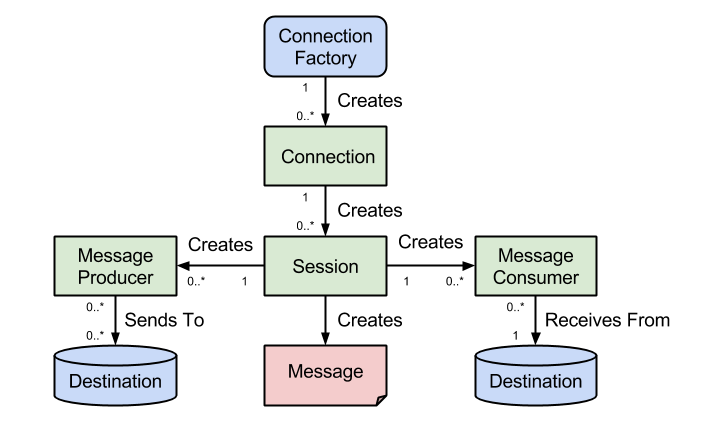
The basic building blocks of the JMS API programming model are shown above. At the top we have the ConnectionFactory object which is the object a client uses to create a connection to a JMS provider. A connection factory encapsulates a set of connection configuration parameters like for example the broker URL. A connection factory is a JMS administered object that is typically created by an administrator and later used by JMS clients.

When you have a ConnectionFactory object, you can use it to create a connection. A Connection object encapsulates a virtual connection with a JMS provider. For example, a connection could represent an open TCP/IP socket between a client and a provider service daemon. Before an application completes, it must close any connections that were created. Failure to close a connection can cause resources not to be released by the JMS provider.
Closing a connection also closes its sessions and their message producers/message consumers.
A session is a single-threaded context for producing and consuming messages. A session provides a transactional context with which to group a set of sends and receives into an atomic unit of work. Session objects are created on top of connections.
As mentioned above, it is important to note that everything from a session down is single-threaded!
A MessageProducer is an object that is created by a session and used for sending messages to a destination. You use a Session object to create a message producer for a destination.
It is possible to create an unidentified producer by specifying a null Destination as argument to the createProducer() method. When sending a message, overload the send method with the needed destination as the first parameter.
A MessageConsumer is an object that is created by a session and used for receiving messages sent to a destination. After you have created a message consumer it becomes active, and you can use it to receive messages. Message delivery does not begin until you start the connection you created by calling its start() method.
Remember to always to call the start() method on the Connection object in order to receive messages!
A Destination is the object a client uses to specify the target of messages it produces and the source of messages it consumes. In the point-to-point messaging domain, destinations are called queues. In the publish/subscribe messaging domain, destinations are called topics.

For more detailed information please check the JMS API programming model chapter of the Java EE 6 tutorial.

ActiveMQ Example

Let's illustrate the above by creating a message producer that sends a message containing a first and last name to a Hello World queue. In turn a message consumer will read the message and transform it into a greeting. The example uses Maven and assumes a default ActiveMQ message broker is up and running.

Tools used:
  • ActiveMQ 5.10
  • Maven 3

First let's look at the below Maven POM file which contains the needed dependencies for Logback, JUnit and ActiveMQ.
<?xml version="1.0" encoding="UTF-8"?>
<project xmlns="http://maven.apache.org/POM/4.0.0" xmlns:xsi="http://www.w3.org/2001/XMLSchema-instance"
xsi:schemaLocation="http://maven.apache.org/POM/4.0.0 http://maven.apache.org/xsd/maven-4.0.0.xsd">
<modelVersion>4.0.0</modelVersion>

<groupId>info.source4code</groupId>
<artifactId>jms-activemq-helloworld</artifactId>
<version>1.0</version>
<packaging>jar</packaging>

<name>JMS - Hello World using ActiveMQ</name>
<url>http://www.source4code.info/2014/10/jms-hello-world-using-activemq.html</url>

<properties>
<project.build.sourceEncoding>UTF-8</project.build.sourceEncoding>
<java.version>1.6</java.version>

<logback.version>1.1.2</logback.version>
<slf4j.version>1.7.7</slf4j.version>
<junit.version>4.12-beta-2</junit.version>
<activemq.version>5.10.0</activemq.version>

<maven-compiler-plugin.version>3.1</maven-compiler-plugin.version>
</properties>

<dependencies>
<!-- Logging -->
<dependency>
<groupId>ch.qos.logback</groupId>
<artifactId>logback-classic</artifactId>
<version>${logback.version}</version>
</dependency>
<dependency>
<groupId>org.slf4j</groupId>
<artifactId>slf4j-api</artifactId>
<version>${slf4j.version}</version>
</dependency>
<!-- JUnit -->
<dependency>
<groupId>junit</groupId>
<artifactId>junit</artifactId>
<version>${junit.version}</version>
<scope>test</scope>
</dependency>
<!-- ActiveMQ -->
<dependency>
<groupId>org.apache.activemq</groupId>
<artifactId>activemq-all</artifactId>
<version>${activemq.version}</version>
</dependency>
</dependencies>

<build>
<plugins>
<plugin>
<groupId>org.apache.maven.plugins</groupId>
<artifactId>maven-compiler-plugin</artifactId>
<version>${maven-compiler-plugin.version}</version>
<configuration>
<source>${java.version}</source>
<target>${java.version}</target>
</configuration>
</plugin>
</plugins>
</build>
</project>

The Producer class below illustrates how to use the JMS API programming model. The create() method will first create an instance of the ConnectionFactory which is in turn used to create a connection to ActiveMQ using the default broker URL. Using the Connection instance, a Session is created which is used to create a Destination and MessageProducer instance. The destination type in the below example is a queue.

The class also contains a close() method which allows to correctly release the resources at the JMS provider. The depending Session and MessageProducer objects are automatically closed when calling this method.

The sendName() method takes as input a first and last name and concatenates them into a single string. Using the session a JMS TextMessage is created on which the string is set. Using the message producer the message is sent to the JMS provider.
package info.source4code.jms;

import javax.jms.Connection;
import javax.jms.ConnectionFactory;
import javax.jms.Destination;
import javax.jms.JMSException;
import javax.jms.MessageProducer;
import javax.jms.Session;
import javax.jms.TextMessage;

import org.apache.activemq.ActiveMQConnection;
import org.apache.activemq.ActiveMQConnectionFactory;
import org.slf4j.Logger;
import org.slf4j.LoggerFactory;

public class Producer {

private static final Logger LOGGER = LoggerFactory
.getLogger(Producer.class);

private Connection connection;
private Session session;
private MessageProducer messageProducer;

public void create(String destinationName) throws JMSException {

// create a Connection Factory
ConnectionFactory connectionFactory = new ActiveMQConnectionFactory(
ActiveMQConnection.DEFAULT_BROKER_URL);

// create a Connection
connection = connectionFactory.createConnection();

// create a Session
session = connection.createSession(false, Session.AUTO_ACKNOWLEDGE);

// create the Destination to which messages will be sent
Destination destination = session.createQueue(destinationName);

// create a Message Producer for sending messages
messageProducer = session.createProducer(destination);
}

public void close() throws JMSException {
connection.close();
}

public void sendName(String firstName, String lastName) throws JMSException {

String text = firstName + " " + lastName;

// create a JMS TextMessage
TextMessage textMessage = session.createTextMessage(text);

// send the message to the queue destination
messageProducer.send(textMessage);

LOGGER.debug("producer sent message with text='{}'", text);
}
}

For receiving messages, a Consumer class is defined which has the same create() and close() methods as the above Producer. The main difference is that in the case of a message consumer the connection is started.

The getGreeting() method will receive the next message from the destination that was configured on the message consumer. A timeout parameter is passed to the receive() method in order to avoid waiting for an indefinite amount of time in case no message is present on the destination. As a result a check is needed to see if the receive() method returned a message or null.

If a message was received it is cast to a TextMessage and the received text is converted into a greeting that is returned. In case the message was null a default "no greeting" is returned.
package info.source4code.jms;

import javax.jms.Connection;
import javax.jms.ConnectionFactory;
import javax.jms.Destination;
import javax.jms.JMSException;
import javax.jms.Message;
import javax.jms.MessageConsumer;
import javax.jms.Session;
import javax.jms.TextMessage;

import org.apache.activemq.ActiveMQConnection;
import org.apache.activemq.ActiveMQConnectionFactory;
import org.slf4j.Logger;
import org.slf4j.LoggerFactory;

public class Consumer {

private static final Logger LOGGER = LoggerFactory
.getLogger(Consumer.class);

private static String NO_GREETING = "no greeting";

private Connection connection;
private Session session;
private MessageConsumer messageConsumer;

public void create(String destinationName) throws JMSException {

// create a Connection Factory
ConnectionFactory connectionFactory = new ActiveMQConnectionFactory(
ActiveMQConnection.DEFAULT_BROKER_URL);

// create a Connection
connection = connectionFactory.createConnection();

// create a Session
session = connection.createSession(false, Session.AUTO_ACKNOWLEDGE);

// create the Destination from which messages will be received
Destination destination = session.createQueue(destinationName);

// create a Message Consumer for receiving messages
messageConsumer = session.createConsumer(destination);

// start the connection in order to receive messages
connection.start();
}

public void close() throws JMSException {
connection.close();
}

public String getGreeting(int timeout) throws JMSException {

String greeting = NO_GREETING;

// read a message from the queue destination
Message message = messageConsumer.receive(timeout);

// check if a message was received
if (message != null) {
// cast the message to the correct type
TextMessage textMessage = (TextMessage) message;

// retrieve the message content
String text = textMessage.getText();
LOGGER.debug("consumer received message with text='{}'", text);

// create greeting
greeting = "Hello " + text + "!";
} else {
LOGGER.debug("consumer received no message");
}

LOGGER.info("greeting={}", greeting);
return greeting;
}
}

In order to test above classes, below JUnit test class is created which contains two test cases. The first is a testGetGreeting() test case in which the producer is used to send a first and last name. Using the consumer the sent message is read and converted into a greeting. The second testNoGreeting() test case verifies the correct working of reading a destination when it contains no messages and as such "no greeting" is returned.
package info.source4code.jms;

import static org.junit.Assert.assertEquals;
import static org.junit.Assert.fail;

import javax.jms.JMSException;

import org.junit.AfterClass;
import org.junit.BeforeClass;
import org.junit.Test;

public class ProducerTest {

private static Producer producer;
private static Consumer consumer;

@BeforeClass
public static void setUpBeforeClass() throws JMSException {
producer = new Producer();
producer.create("helloworld.q");

consumer = new Consumer();
consumer.create("helloworld.q");
}

@AfterClass
public static void tearDownAfterClass() throws JMSException {
producer.close();
consumer.close();
}

@Test
public void testGetGreeting() {
try {
producer.sendName("John", "Doe");

String greeting = consumer.getGreeting(1000);
assertEquals("Hello John Doe!", greeting);

} catch (JMSException e) {
fail("a JMS Exception occurred");
}
}

@Test
public void testNoGreeting() {
try {
String greeting = consumer.getGreeting(1000);
assertEquals("no greeting", greeting);

} catch (JMSException e) {
fail("a JMS Exception occurred");
}
}
}

Make sure a default ActiveMQ message broker is up and running, open a command prompt and execute following Maven command:
mvn test

This will trigger Maven to run the above test case and will result in the following log statements.
13:38:19.844 DEBUG [main][Consumer]
consumer received no message
13:38:19.858 INFO [main][Consumer]
greeting=no greeting
13:38:19.911 DEBUG [main][Producer]
producer sent message with text='John Doe'
13:38:19.912 DEBUG [main][Consumer]
consumer received message with text='John Doe'
13:38:19.912 INFO [main][Consumer]
greeting=Hello John Doe!
Tests run: 2, Failures: 0, Errors: 0, Skipped: 0, Time elapsed: 1.579 sec


github icon
If you would like to run the above code sample you can download the full source code and their corresponding JUnit test cases here.

This concludes the JMS Hello World example using ActiveMQ. Note that the code also contains a UnidentifiedProducer class and corresponding JUnit test class which illustrates the overloading of the send() method with the needed destination. If you found this post helpful or have any questions or remarks, please leave a comment.

Sunday, September 21, 2014

JAX-WS - CXF logging request and response SOAP messages using Logback

apache cxf logo
CXF uses Java SE Logging for both client- and server-side logging of SOAP requests and responses. Logging is activated by use of separate in/out interceptors that can be attached to the requester and/or provider as required. These interceptors can be specified either programmatically (via Java code and/or annotations) or via use of configuration files. The following code sample shows how to configure CXF interceptors using Logback for the Hello World web service from a previous post.

Tools used:
  • CXF 3.0
  • Spring 4.1
  • Logback 1.1
  • Jetty 8
  • Maven 3

Specifying the interceptors via configuration files offers two benefits over programmatic configuration:
  1. Logging requirements can be altered without needing to recompile the code
  2. No Apache CXF-specific APIs need to be added to your code, which helps it remain interoperable with other JAX-WS compliant web service stacks

For this example Logback will be used which is a successor to the Log4j project. As a best practice the CXF java.util.logging calls will first be redirected to SLF4J (Simple Logging Facade for Java) as described here. In other words a 'META-INF/cxf/org.apache.cxf.Logger' file will be created on the classpath containing the following:
org.apache.cxf.common.logging.Slf4jLogger

As the Hello World example uses Spring, the commons-logging calls from the Spring framework will also be redirected to SLF4J using jcl-over-slf4j. Now that all logging calls of both CXF and Spring are redirected to SLF4J, Logback will receive them automatically as it natively implements SLF4J. The picture below illustrates the described approach.
cxf logging using logback

The below Maven POM file contains the needed dependencies for the SLF4 bridge (jcl-over-slf4j) and Logback (logback-classic). In addition it contains all other needed dependencies and plugins needed in order to run the example.
<?xml version="1.0" encoding="UTF-8"?>
<project xmlns="http://maven.apache.org/POM/4.0.0" xmlns:xsi="http://www.w3.org/2001/XMLSchema-instance"
xsi:schemaLocation="http://maven.apache.org/POM/4.0.0 http://maven.apache.org/xsd/maven-4.0.0.xsd">
<modelVersion>4.0.0</modelVersion>

<groupId>info.source4code</groupId>
<artifactId>jaxws-jetty-cxf-logging-logback</artifactId>
<version>1.0</version>
<packaging>war</packaging>

<name>JAX-WS - CXF logging request and response SOAP messages using Logback</name>
<url>http://www.source4code.info/2014/09/jaxws-cxf-logging-request-response-soap-messages-logback.html</url>

<prerequisites>
<maven>3.0</maven>
</prerequisites>

<properties>
<project.build.sourceEncoding>UTF-8</project.build.sourceEncoding>
<java.version>1.6</java.version>

<slf4j.version>1.7.10</slf4j.version>
<logback.version>1.1.2</logback.version>
<junit.version>4.12</junit.version>
<cxf.version>3.0.3</cxf.version>
<spring.version>4.1.4.RELEASE</spring.version>

<maven-compiler-plugin.version>3.1</maven-compiler-plugin.version>
<jetty-maven-plugin.version>8.1.16.v20140903</jetty-maven-plugin.version>
<maven-failsafe-plugin.version>2.17</maven-failsafe-plugin.version>
</properties>

<dependencies>
<!-- Logging -->
<dependency>
<groupId>org.slf4j</groupId>
<artifactId>jcl-over-slf4j</artifactId>
<version>${slf4j.version}</version>
</dependency>
<dependency>
<groupId>ch.qos.logback</groupId>
<artifactId>logback-classic</artifactId>
<version>${logback.version}</version>
</dependency>
<!-- JUnit -->
<dependency>
<groupId>junit</groupId>
<artifactId>junit</artifactId>
<version>${junit.version}</version>
<scope>test</scope>
</dependency>
<!-- CXF -->
<dependency>
<groupId>org.apache.cxf</groupId>
<artifactId>cxf-rt-frontend-jaxws</artifactId>
<version>${cxf.version}</version>
</dependency>
<dependency>
<groupId>org.apache.cxf</groupId>
<artifactId>cxf-rt-transports-http</artifactId>
<version>${cxf.version}</version>
</dependency>
<dependency>
<groupId>org.apache.cxf</groupId>
<!-- Jetty is needed if you're are not using the CXFServlet -->
<artifactId>cxf-rt-transports-http-jetty</artifactId>
<version>${cxf.version}</version>
</dependency>
<!-- Spring -->
<dependency>
<groupId>org.springframework</groupId>
<artifactId>spring-context</artifactId>
<version>${spring.version}</version>
<exclusions>
<exclusion>
<artifactId>commons-logging</artifactId>
<groupId>commons-logging</groupId>
</exclusion>
</exclusions>
</dependency>
<dependency>
<groupId>org.springframework</groupId>
<artifactId>spring-web</artifactId>
<version>${spring.version}</version>
<exclusions>
<exclusion>
<artifactId>commons-logging</artifactId>
<groupId>commons-logging</groupId>
</exclusion>
</exclusions>
</dependency>
<dependency>
<groupId>org.springframework</groupId>
<artifactId>spring-test</artifactId>
<version>${spring.version}</version>
<scope>test</scope>
<exclusions>
<exclusion>
<artifactId>commons-logging</artifactId>
<groupId>commons-logging</groupId>
</exclusion>
</exclusions>
</dependency>
</dependencies>

<build>
<plugins>
<plugin>
<groupId>org.apache.maven.plugins</groupId>
<artifactId>maven-compiler-plugin</artifactId>
<version>${maven-compiler-plugin.version}</version>
<configuration>
<source>${java.version}</source>
<target>${java.version}</target>
</configuration>
</plugin>
<!-- jetty-maven-plugin -->
<plugin>
<groupId>org.mortbay.jetty</groupId>
<artifactId>jetty-maven-plugin</artifactId>
<version>${jetty-maven-plugin.version}</version>
<configuration>
<connectors>
<connector
implementation="org.eclipse.jetty.server.nio.SelectChannelConnector">
<port>9090</port>
</connector>
</connectors>
<stopPort>8005</stopPort>
<stopKey>STOP</stopKey>
<daemon>true</daemon>
</configuration>
<executions>
<execution>
<id>start-jetty</id>
<phase>pre-integration-test</phase>
<goals>
<goal>start</goal>
</goals>
</execution>
<execution>
<id>stop-jetty</id>
<phase>post-integration-test</phase>
<goals>
<goal>stop</goal>
</goals>
</execution>
</executions>
</plugin>
<!-- maven-failsafe-plugin -->
<plugin>
<groupId>org.apache.maven.plugins</groupId>
<artifactId>maven-failsafe-plugin</artifactId>
<version>${maven-failsafe-plugin.version}</version>
<executions>
<execution>
<goals>
<goal>integration-test</goal>
<goal>verify</goal>
</goals>
</execution>
</executions>
</plugin>
<!-- cxf-codegen-plugin -->
<plugin>
<groupId>org.apache.cxf</groupId>
<artifactId>cxf-codegen-plugin</artifactId>
<version>${cxf.version}</version>
<executions>
<execution>
<id>generate-sources</id>
<phase>generate-sources</phase>
<configuration>
<sourceRoot>${project.build.directory}/generated/cxf</sourceRoot>
<wsdlOptions>
<wsdlOption>
<wsdl>${project.basedir}/src/main/resources/wsdl/helloworld.wsdl</wsdl>
<wsdlLocation>classpath:wsdl/helloworld.wsdl</wsdlLocation>
</wsdlOption>
</wsdlOptions>
</configuration>
<goals>
<goal>wsdl2java</goal>
</goals>
</execution>
</executions>
</plugin>
</plugins>
</build>
</project>

Logback Configuration

Logback can be configured either programmatically or with a configuration script expressed in XML or Groovy format. For this example a configuration script in XML is used as shown below. The script will write all logging events to a file except for the request and response SOAP messages that will be written to a different file.

After defining some properties that contain the layout pattern and file names, two appenders are configured to write logging events to a rolling file. The first file 'jaxws-jetty-cxf-logging.log' will contain all log events except for the ones emitted by the CXF logging interceptors as these are going to be written to 'jaxws-jetty-cxf-logging-ws.log'.

The last section contains the different loggers and the level at which information is logged. The log level of the 'org.apache.cxf.services' logger needs to be set to INFO in order to activate the SOAP logging events. In addition the WS_LOG_FILE appender needs to be referenced in order to write the SOAP logging events to a different file. Note the additivity="false" which makes sure the log events are not written to appenders attached to its ancestors (in this case APP_LOG_FILE).
<?xml version="1.0" encoding="UTF-8"?>
<configuration scan="true" scanPeriod="60 seconds">

<!-- PROPERTIES -->
<property name="layout" value="%d{HH:mm:ss.SSS} %-5level [%thread][%logger{0}] %m%n" />
<property name="logFile" value="jaxws-jetty-cxf-logging" />
<property name="logFile-ws" value="jaxws-jetty-cxf-logging-ws" />

<!-- APPENDERS -->
<appender name="APP_LOG_FILE" class="ch.qos.logback.core.rolling.RollingFileAppender">
<File>${logFile}.log</File>
<rollingPolicy class="ch.qos.logback.core.rolling.TimeBasedRollingPolicy">
<fileNamePattern>${logFile}.%d{yyyy-MM-dd}.log</fileNamePattern>
<maxHistory>30</maxHistory>
</rollingPolicy>
<encoder>
<pattern>${layout}</pattern>
</encoder>
</appender>

<appender name="WS_LOG_FILE" class="ch.qos.logback.core.rolling.RollingFileAppender">
<file>${logFile-ws}.log</file>
<rollingPolicy class="ch.qos.logback.core.rolling.TimeBasedRollingPolicy">
<fileNamePattern>${logFile-ws}.%d{yyyy-MM-dd}.log</fileNamePattern>
<maxHistory>30</maxHistory>
</rollingPolicy>
<encoder>
<pattern>${layout}</pattern>
</encoder>
</appender>

<!-- LOGGERS -->
<logger name="info.source4code.soap.http.cxf" level="INFO" />

<logger name="org.springframework" level="WARN" />
<logger name="org.apache.cxf" level="WARN" />

<!-- level INFO needed to log SOAP messages -->
<logger name="org.apache.cxf.services" level="INFO"
additivity="false">
<!-- specify a dedicated appender for the SOAP messages -->
<appender-ref ref="WS_LOG_FILE" />
</logger>

<!-- APPLICATION LOG LEVEL -->
<root level="WARN">
<appender-ref ref="APP_LOG_FILE" />
</root>

</configuration>

Requester

In order to activate the logging interceptors provided by the CXF framework, there are two options. For the requester(client) the option where all logging interceptors are configured manually will be illustrated. The other option, where the logging feature is used to configure all interceptors, will be shown in the provider section down below. For more information on the difference between interceptors and features check out this post.

First an instance of the abstract AbstractLoggingInterceptor class is created to enable pretty printing of the SOAP messages. Next, instances of the LoggingInInterceptor and LoggingOutInterceptor are specified which have as parent the previously defined abstractLoggingInterceptor instance. In a last step the interceptors are added to the CXF bus, which is the backbone of the CXF architecture that manages the respective inbound and outbound message and fault interceptor chains for all client and server endpoints. The interceptors are added to both in/out and respective fault interceptor chains as shown below.
Note that interceptors can be added to a client, server or bus.
<?xml version="1.0" encoding="UTF-8"?>
<beans xmlns="http://www.springframework.org/schema/beans"
xmlns:xsi="http://www.w3.org/2001/XMLSchema-instance" xmlns:cxf="http://cxf.apache.org/core"
xmlns:jaxws="http://cxf.apache.org/jaxws"
xsi:schemaLocation="
http://www.springframework.org/schema/beans
http://www.springframework.org/schema/beans/spring-beans.xsd
http://cxf.apache.org/core http://cxf.apache.org/schemas/core.xsd
http://cxf.apache.org/jaxws http://cxf.apache.org/schemas/jaxws.xsd">

<jaxws:client id="helloWorldRequesterBean"
serviceClass="info.source4code.services.helloworld.HelloWorldPortType"
address="${helloworld.address}">
</jaxws:client>

<!-- abstractLoggingInterceptor that will enable pretty printing of messages -->
<bean id="abstractLoggingInterceptor" abstract="true">
<property name="prettyLogging" value="true" />
</bean>

<!-- logging interceptors that will log all received/sent messages -->
<bean id="loggingInInterceptor" class="org.apache.cxf.interceptor.LoggingInInterceptor"
parent="abstractLoggingInterceptor">
</bean>
<bean id="loggingOutInterceptor" class="org.apache.cxf.interceptor.LoggingOutInterceptor"
parent="abstractLoggingInterceptor">
</bean>

<!-- add the logging interceptors to the CXF bus -->
<cxf:bus>
<cxf:inInterceptors>
<ref bean="loggingInInterceptor" />
</cxf:inInterceptors>
<cxf:inFaultInterceptors>
<ref bean="loggingInInterceptor" />
</cxf:inFaultInterceptors>
<cxf:outInterceptors>
<ref bean="loggingOutInterceptor" />
</cxf:outInterceptors>
<cxf:outFaultInterceptors>
<ref bean="loggingOutInterceptor" />
</cxf:outFaultInterceptors>
</cxf:bus>

</beans>

Provider

Activating the interceptors at provider(server) side will be done using the LoggingFeature that is supplied with the CXF framework.

First an instance of the abstract LoggingFeature class is created with the prettyLogging set to true in order to enable pretty printing of the SOAP messages. As with the interceptors, the feature is added to the CXF bus in order to activate them as shown below.
Note that features can be added to a client, server or a bus.
<?xml version="1.0" encoding="UTF-8"?>
<beans xmlns="http://www.springframework.org/schema/beans"
xmlns:xsi="http://www.w3.org/2001/XMLSchema-instance" xmlns:cxf="http://cxf.apache.org/core"
xmlns:jaxws="http://cxf.apache.org/jaxws"
xsi:schemaLocation="
http://www.springframework.org/schema/beans
http://www.springframework.org/schema/beans/spring-beans.xsd
http://cxf.apache.org/core http://cxf.apache.org/schemas/core.xsd
http://cxf.apache.org/jaxws http://cxf.apache.org/schemas/jaxws.xsd">

<jaxws:endpoint id="helloWorldProviderBean"
implementor="info.source4code.soap.http.cxf.HelloWorldImpl"
address="/helloworld">
</jaxws:endpoint>

<!-- loggingFeature that will log all received/sent messages -->
<bean id="loggingFeature" class="org.apache.cxf.feature.LoggingFeature">
<property name="prettyLogging" value="true" />
</bean>

<!-- add the loggingFeature to the cxf bus -->
<cxf:bus>
<cxf:features>
<ref bean="loggingFeature" />
</cxf:features>
</cxf:bus>

</beans>

Testing

Testing of the service is done using a unit and an integration test case. For the unit test case the provider is created without Spring (using JaxWsServerFactoryBean), as such the logging feature needs to be added programmatically as shown below.
package info.source4code.soap.http.cxf;

import static org.junit.Assert.assertEquals;
import info.source4code.services.helloworld.Person;

import org.apache.cxf.feature.LoggingFeature;
import org.apache.cxf.jaxws.JaxWsServerFactoryBean;
import org.junit.BeforeClass;
import org.junit.Test;
import org.junit.runner.RunWith;
import org.springframework.beans.factory.annotation.Autowired;
import org.springframework.test.context.ContextConfiguration;
import org.springframework.test.context.junit4.SpringJUnit4ClassRunner;

@RunWith(SpringJUnit4ClassRunner.class)
@ContextConfiguration(locations = { "classpath:/META-INF/spring/context-requester.xml" })
public class HelloWorldImplTest {

private static String ENDPOINT_ADDRESS = "http://localhost:9090/s4c/services/helloworld";

@Autowired
private HelloWorldClient helloWorldClient;

@BeforeClass
public static void setUpBeforeClass() throws Exception {
// start the HelloWorld service using jaxWsServerFactoryBean
JaxWsServerFactoryBean jaxWsServerFactoryBean = new JaxWsServerFactoryBean();

// adding loggingFeature to print the received/sent messages
LoggingFeature loggingFeature = new LoggingFeature();
loggingFeature.setPrettyLogging(true);

jaxWsServerFactoryBean.getFeatures().add(loggingFeature);

// setting the implementation
HelloWorldImpl implementor = new HelloWorldImpl();
jaxWsServerFactoryBean.setServiceBean(implementor);
// setting the endpoint
jaxWsServerFactoryBean.setAddress(ENDPOINT_ADDRESS);
jaxWsServerFactoryBean.create();
}

@Test
public void testSayHello() {
Person person = new Person();
person.setFirstName("John");
person.setLastName("Doe");

assertEquals("Hello John Doe!",
helloWorldClient.sayHello(person));
}
}

Run the example by opening a command prompt and executing following Maven command:
mvn verify

The result should be that a number of log files are created in the project root directory. Amongst these files there should be 'jaxws-jetty-cxf-logging-ws.log' and 'jaxws-jetty-cxf-logging-ws-test.log' which contain the exchanged SOAP messages.
06:26:41.718 INFO  [qtp1766911175-27][HelloWorld_PortType] Inbound Message
----------------------------
ID: 1
Address: http://localhost:9090/s4c/services/helloworld
Encoding: UTF-8
Http-Method: POST
Content-Type: text/xml; charset=UTF-8
Headers: {Accept=[*/*], Cache-Control=[no-cache], connection=[keep-alive], Content-Length=[229], content-type=[text/xml; charset=UTF-8], Host=[localhost:9090], Pragma=[no-cache], SOAPAction=[""], User-Agent=[Apache CXF 3.0.3]}
Payload: <soap:Envelope xmlns:soap="http://schemas.xmlsoap.org/soap/envelope/">
<soap:Body>
<person xmlns="http://source4code.info/services/helloworld">
<firstName>John</firstName>
<lastName>Doe</lastName>
</person>
</soap:Body>
</soap:Envelope>

--------------------------------------
06:26:41.786 INFO [qtp1766911175-27][HelloWorld_PortType] Outbound Message
---------------------------
ID: 1
Response-Code: 200
Encoding: UTF-8
Content-Type: text/xml
Headers: {}
Payload: <soap:Envelope xmlns:soap="http://schemas.xmlsoap.org/soap/envelope/">
<soap:Body>
<greeting xmlns="http://source4code.info/services/helloworld">
<text>Hello John Doe!</text>
</greeting>
</soap:Body>
</soap:Envelope>


github icon
If you would like to run the above code sample you can download the full source code and their corresponding JUnit and integration test cases here.

This concludes the CXF logging request and response messages using Logback example. If you found this post helpful or have any questions or remarks, please leave a comment.

Saturday, August 23, 2014

JAX-WS - CXF contract first Hello World web service using Jetty and Maven

apache cxf logo
Apache CXF is an open source services framework. CXF helps to build and develop services using front end programming APIs like JAX-WS and JAX-RS. These services can speak a variety of protocols such as SOAP, XML/HTTP or RESTful HTTP and work over a variety of transports such as HTTP or JMS. The following post illustrates a basic example in which we will configure, build and run a Hello World contract first client and web service using CXF, Maven and Jetty.

Tools used:
  • CXF 3.0
  • Spring 4.1
  • Maven 3
  • Jetty 8

A web service can be developed using one of two approaches:
  1. Start with a WSDL contract and generate Java objects to implement the service.
  2. Start with a Java object and service enable it using annotations.

For new development the preferred approach is to first design your services using the Web Services Description Language (WSDL) and then generate the code to implement them. This approach enforces the concept that a service is an abstract entity that is implementation neutral. For the following example we will use a Hello World service that is defined by the WSDL shown below. It takes as input a persons first and last name and as result returns a greeting.
<?xml version="1.0" encoding="UTF-8" standalone="no"?>
<wsdl:definitions targetNamespace="http://source4code.info/services/helloworld"
xmlns:soap="http://schemas.xmlsoap.org/wsdl/soap/" xmlns:tns="http://source4code.info/services/helloworld"
xmlns:wsdl="http://schemas.xmlsoap.org/wsdl/" xmlns:xsd="http://www.w3.org/2001/XMLSchema"
name="HelloWorld">

<wsdl:types>
<schema targetNamespace="http://source4code.info/services/helloworld"
xmlns="http://www.w3.org/2001/XMLSchema" xmlns:tns="http://source4code.info/services/helloworld"
elementFormDefault="qualified" attributeFormDefault="unqualified"
version="1.0">

<element name="person">
<complexType>
<sequence>
<element name="firstName" type="xsd:string" />
<element name="lastName" type="xsd:string" />
</sequence>
</complexType>
</element>

<element name="greeting">
<complexType>
<sequence>
<element name="text" type="xsd:string" />
</sequence>
</complexType>
</element>
</schema>
</wsdl:types>

<wsdl:message name="sayHelloRequest">
<wsdl:part name="person" element="tns:person"></wsdl:part>
</wsdl:message>

<wsdl:message name="sayHelloResponse">
<wsdl:part name="greeting" element="tns:greeting"></wsdl:part>
</wsdl:message>

<wsdl:portType name="HelloWorld_PortType">
<wsdl:operation name="sayHello">
<wsdl:input message="tns:sayHelloRequest"></wsdl:input>
<wsdl:output message="tns:sayHelloResponse"></wsdl:output>
</wsdl:operation>
</wsdl:portType>

<wsdl:binding name="HelloWorld_Binding" type="tns:HelloWorld_PortType">
<soap:binding style="document"
transport="http://schemas.xmlsoap.org/soap/http" />
<wsdl:operation name="sayHello">
<wsdl:input>
<soap:body use="literal" />
</wsdl:input>
<wsdl:output>
<soap:body use="literal" />
</wsdl:output>
</wsdl:operation>
</wsdl:binding>

<wsdl:service name="HelloWorld_Service">
<wsdl:port name="HelloWorld_Port" binding="tns:HelloWorld_Binding">
<soap:address
location="http://localhost:9090/s4c/services/helloworld" />
</wsdl:port>
</wsdl:service>
</wsdl:definitions>

Next is the Maven POM file which contains the needed dependencies. At the bottom of the list we find the CXF dependencies. The 'cxf-rt-transports-http-jetty' dependency is only needed in case the CFXServlet is not used. As the example includes a JUnit test that runs without CXFServlet we need to add this dependency.

CXF supports the Spring 2.0 XML syntax, which makes it easy to declare endpoints which are backed by Spring and inject clients into application code. It is also possible to use CXF without Spring but it may take a little extra effort. A number of things like policies and annotation processing are not wired in without Spring. To take advantage of those you would need to do some pre-setup coding. The example below will use Spring to create both requester (client) and provider (service) as such the needed Spring dependencies are included.

In addition to a unit test case we will also create an integration test case for which an instance of Jetty will be started that will host the above Hello World service. In order to achieve this the 'jetty-maven-plugin' has been added which is configured to be started/stopped, before/after the integration-test phase of Maven. The '<daemon>true</daemon>' configuration option forces Jetty to execute only while Maven is running, instead of running indefinitely.
<?xml version="1.0" encoding="UTF-8"?>
<project xmlns="http://maven.apache.org/POM/4.0.0" xmlns:xsi="http://www.w3.org/2001/XMLSchema-instance"
xsi:schemaLocation="http://maven.apache.org/POM/4.0.0 http://maven.apache.org/xsd/maven-4.0.0.xsd">
<modelVersion>4.0.0</modelVersion>

<groupId>info.source4code</groupId>
<artifactId>jaxws-jetty-cxf-helloworld</artifactId>
<version>1.0</version>
<packaging>war</packaging>

<name>JAX-WS - CXF contract first Hello World web service using Jetty and Maven</name>
<url>http://www.source4code.info/2014/08/jaxws-cxf-contract-first-hello-world-jetty-maven.html</url>

<prerequisites>
<maven>3.0</maven>
</prerequisites>

<properties>
<project.build.sourceEncoding>UTF-8</project.build.sourceEncoding>
<java.version>1.6</java.version>

<slf4j.version>1.7.10</slf4j.version>
<logback.version>1.1.2</logback.version>
<junit.version>4.12</junit.version>
<cxf.version>3.0.3</cxf.version>
<spring.version>4.1.4.RELEASE</spring.version>

<maven-compiler-plugin.version>3.1</maven-compiler-plugin.version>
<jetty-maven-plugin.version>8.1.16.v20140903</jetty-maven-plugin.version>
<maven-failsafe-plugin.version>2.17</maven-failsafe-plugin.version>
</properties>

<dependencies>
<!-- Logging -->
<dependency>
<groupId>org.slf4j</groupId>
<artifactId>jcl-over-slf4j</artifactId>
<version>${slf4j.version}</version>
</dependency>
<dependency>
<groupId>ch.qos.logback</groupId>
<artifactId>logback-classic</artifactId>
<version>${logback.version}</version>
</dependency>
<!-- JUnit -->
<dependency>
<groupId>junit</groupId>
<artifactId>junit</artifactId>
<version>${junit.version}</version>
<scope>test</scope>
</dependency>
<!-- CXF -->
<dependency>
<groupId>org.apache.cxf</groupId>
<artifactId>cxf-rt-frontend-jaxws</artifactId>
<version>${cxf.version}</version>
</dependency>
<dependency>
<groupId>org.apache.cxf</groupId>
<artifactId>cxf-rt-transports-http</artifactId>
<version>${cxf.version}</version>
</dependency>
<dependency>
<groupId>org.apache.cxf</groupId>
<!-- Jetty is needed if you're are not using the CXFServlet -->
<artifactId>cxf-rt-transports-http-jetty</artifactId>
<version>${cxf.version}</version>
</dependency>
<!-- Spring -->
<dependency>
<groupId>org.springframework</groupId>
<artifactId>spring-context</artifactId>
<version>${spring.version}</version>
<exclusions>
<exclusion>
<artifactId>commons-logging</artifactId>
<groupId>commons-logging</groupId>
</exclusion>
</exclusions>
</dependency>
<dependency>
<groupId>org.springframework</groupId>
<artifactId>spring-web</artifactId>
<version>${spring.version}</version>
<exclusions>
<exclusion>
<artifactId>commons-logging</artifactId>
<groupId>commons-logging</groupId>
</exclusion>
</exclusions>
</dependency>
<dependency>
<groupId>org.springframework</groupId>
<artifactId>spring-test</artifactId>
<version>${spring.version}</version>
<scope>test</scope>
<exclusions>
<exclusion>
<artifactId>commons-logging</artifactId>
<groupId>commons-logging</groupId>
</exclusion>
</exclusions>
</dependency>
</dependencies>

<build>
<plugins>
<plugin>
<groupId>org.apache.maven.plugins</groupId>
<artifactId>maven-compiler-plugin</artifactId>
<version>${maven-compiler-plugin.version}</version>
<configuration>
<source>${java.version}</source>
<target>${java.version}</target>
</configuration>
</plugin>
<!-- jetty-maven-plugin -->
<plugin>
<groupId>org.mortbay.jetty</groupId>
<artifactId>jetty-maven-plugin</artifactId>
<version>${jetty-maven-plugin.version}</version>
<configuration>
<connectors>
<connector
implementation="org.eclipse.jetty.server.nio.SelectChannelConnector">
<port>9090</port>
</connector>
</connectors>
<stopPort>8005</stopPort>
<stopKey>STOP</stopKey>
<daemon>true</daemon>
</configuration>
<executions>
<execution>
<id>start-jetty</id>
<phase>pre-integration-test</phase>
<goals>
<goal>start</goal>
</goals>
</execution>
<execution>
<id>stop-jetty</id>
<phase>post-integration-test</phase>
<goals>
<goal>stop</goal>
</goals>
</execution>
</executions>
</plugin>
<!-- maven-failsafe-plugin -->
<plugin>
<groupId>org.apache.maven.plugins</groupId>
<artifactId>maven-failsafe-plugin</artifactId>
<version>${maven-failsafe-plugin.version}</version>
<executions>
<execution>
<goals>
<goal>integration-test</goal>
<goal>verify</goal>
</goals>
</execution>
</executions>
</plugin>
<!-- cxf-codegen-plugin -->
<plugin>
<groupId>org.apache.cxf</groupId>
<artifactId>cxf-codegen-plugin</artifactId>
<version>${cxf.version}</version>
<executions>
<execution>
<id>generate-sources</id>
<phase>generate-sources</phase>
<configuration>
<sourceRoot>${project.build.directory}/generated/cxf</sourceRoot>
<wsdlOptions>
<wsdlOption>
<wsdl>${project.basedir}/src/main/resources/wsdl/helloworld.wsdl</wsdl>
<wsdlLocation>classpath:wsdl/helloworld.wsdl</wsdlLocation>
</wsdlOption>
</wsdlOptions>
</configuration>
<goals>
<goal>wsdl2java</goal>
</goals>
</execution>
</executions>
</plugin>
</plugins>
</build>
</project>

CXF includes a Maven plugin called 'cxf-codegen-plugin' which can generate Java artifacts from a WSDL. In the above POM the 'wsdl2java' goal is configured to run in the generate-sources phase. By running the below Maven command, CXF will generate the Java artifacts. Each '<wsdlOption>' element corresponds to a WSDL that needs generated artifacts.
mvn generate-sources
In order to avoid a hard-coded absolute path towards the configured WSDL in the generated Java artifacts, specify a '<wsdlLocation>' element using the classpath reference as shown above.
After running the 'mvn generate-sources' command you should be able to find back a number of auto generated classes amongst which the HelloWorldPort interface as shown below. In the next sections we will use this interface to implement both the client and service.

java objects generated from wsdl

Creating the Requester (client)

Creating a CXF client using Spring is done by specifying a jaxws:client bean as shown in the below 'cxf-requester.xml'. In addition to a bean name, the service interface and the service address (or URL) need to be specified. The result of below configuration is a bean that will be created with the specified name, implementing the service interface and invoking the remote SOAP service under the covers.

<?xml version="1.0" encoding="UTF-8"?>
<beans xmlns="http://www.springframework.org/schema/beans"
xmlns:xsi="http://www.w3.org/2001/XMLSchema-instance" xmlns:jaxws="http://cxf.apache.org/jaxws"
xsi:schemaLocation="
http://www.springframework.org/schema/beans http://www.springframework.org/schema/beans/spring-beans.xsd
http://cxf.apache.org/jaxws http://cxf.apache.org/schemas/jaxws.xsd">

<jaxws:client id="helloworldRequesterBean"
serviceClass="info.source4code.services.helloworld.HelloWorldPortType"
address="${helloworld.address}">
</jaxws:client>

</beans>

For this example the CXF Spring configuration is kept in a separate file that is imported in the main 'context-requester.xml' shown below. In addition to this, annotation based configuration is enabled and a 'cxf.properties' file is loaded which contains the address at which the Hello World service was made available in the previous section.
<?xml version="1.0" encoding="UTF-8"?>
<beans xmlns="http://www.springframework.org/schema/beans"
xmlns:xsi="http://www.w3.org/2001/XMLSchema-instance" xmlns:context="http://www.springframework.org/schema/context"
xmlns:p="http://www.springframework.org/schema/p"
xsi:schemaLocation="
http://www.springframework.org/schema/beans http://www.springframework.org/schema/beans/spring-beans.xsd
http://www.springframework.org/schema/context http://www.springframework.org/schema/context/spring-context.xsd">

<!-- import the cxf requester configuration -->
<import resource="classpath:META-INF/spring/cxf-requester.xml" />

<!-- enables annotation based configuration -->
<context:annotation-config />
<!-- scans for annotated classes in the com.company package -->
<context:component-scan base-package="info.source4code.soap.http.cxf" />

<!-- allows for ${} replacement in a spring xml configuration from a
.properties file on the classpath -->
<context:property-placeholder location="classpath:cxf.properties" />

</beans>

The actual client code is specified in the HelloWorldClient class which exposes a sayHello() method that takes as input a Person object. The helloworldRequesterBean previously defined in the 'cxf-requester.xml' is auto wired using the corresponding annotation.

package info.source4code.soap.http.cxf;

import info.source4code.services.helloworld.Greeting;
import info.source4code.services.helloworld.HelloWorldPortType;
import info.source4code.services.helloworld.Person;

import org.slf4j.Logger;
import org.slf4j.LoggerFactory;
import org.springframework.beans.factory.annotation.Autowired;
import org.springframework.stereotype.Component;

@Component
public class HelloWorldClient {

private static final Logger LOGGER = LoggerFactory
.getLogger(HelloWorldClient.class);

@Autowired
private HelloWorldPortType helloworldRequesterBean;

public String sayHello(Person person) {
Greeting greeting = helloworldRequesterBean.sayHello(person);

String result = greeting.getText();
LOGGER.info("result={}", result);
return result;
}
}

Creating the Provider (service)

Creating a CXF service using Spring is done by specifying a jaxws:endpoint bean as shown in the below 'cxf-provider.xml'. In addition to a bean name, the implementer class name and the address at which the service will be published need to be specified. In other words the below configuration tells CXF how to route requests received by the servlet to the service-implementation code.
<?xml version="1.0" encoding="UTF-8"?>
<beans xmlns="http://www.springframework.org/schema/beans"
xmlns:xsi="http://www.w3.org/2001/XMLSchema-instance" xmlns:jaxws="http://cxf.apache.org/jaxws"
xsi:schemaLocation="
http://www.springframework.org/schema/beans http://www.springframework.org/schema/beans/spring-beans.xsd
http://cxf.apache.org/jaxws http://cxf.apache.org/schemas/jaxws.xsd">

<jaxws:endpoint id="helloWorldProviderBean"
implementor="info.source4code.soap.http.cxf.HelloWorldImpl"
address="/helloworld">
</jaxws:endpoint>

</beans>

For the provider, the CXF Spring configuration is kept in a separate file that is imported in the main 'context-provider.xml' shown below.
<?xml version="1.0" encoding="UTF-8"?>
<beans xmlns="http://www.springframework.org/schema/beans"
xmlns:xsi="http://www.w3.org/2001/XMLSchema-instance" xmlns:context="http://www.springframework.org/schema/context"
xmlns:p="http://www.springframework.org/schema/p"
xsi:schemaLocation="
http://www.springframework.org/schema/beans http://www.springframework.org/schema/beans/spring-beans.xsd
http://www.springframework.org/schema/context http://www.springframework.org/schema/context/spring-context.xsd">

<!-- import the cxf provider configuration -->
<import resource="classpath:META-INF/spring/cxf-provider.xml" />

</beans>

Java web applications use a deployment descriptor file to determine how URLs map to servlets and other information. This file is named 'web.xml', and resides in the app's WAR under the 'WEB-INF' directory. The below 'web.xml' defines the CXFServlet and maps all request on '/s4c/services/*' to this servlet.

In this example, a Spring context is used to load the previous defined CXF provider configuration. Spring can be integrated into any Java-based web framework by declaring the ContextLoaderListener and using a contextConfigLocation to set which context file(s) to load.
Note that if a specific 'contextConfigLocation' context parameter is not specified, CXF looks for a context with the file name 'cxf-servlet.xml'.
<?xml version="1.0" encoding="UTF-8"?>
<web-app xmlns="http://java.sun.com/xml/ns/javaee" xmlns:xsi="http://www.w3.org/2001/XMLSchema-instance"
xsi:schemaLocation="http://java.sun.com/xml/ns/javaee http://java.sun.com/xml/ns/javaee/web-app_3_0.xsd"
version="3.0">

<context-param>
<param-name>contextConfigLocation</param-name>
<param-value>classpath:META-INF/spring/context-provider.xml</param-value>
</context-param>

<listener>
<listener-class>org.springframework.web.context.ContextLoaderListener</listener-class>
</listener>

<servlet>
<servlet-name>cxf</servlet-name>
<servlet-class>org.apache.cxf.transport.servlet.CXFServlet</servlet-class>
<load-on-startup>1</load-on-startup>
</servlet>

<servlet-mapping>
<servlet-name>cxf</servlet-name>
<url-pattern>/s4c/services/*</url-pattern>
</servlet-mapping>

</web-app>

The HelloWorldImpl class contains the implementation of the Hello World service. It implements the sayHello() method of the HelloWorldPort interface which was automatically generated by the 'cxf-codegen-plugin'. The method takes a Person object as input and generates a Greeting object that is returned.

package info.source4code.soap.http.cxf;

import info.source4code.services.helloworld.Greeting;
import info.source4code.services.helloworld.HelloWorldPortType;
import info.source4code.services.helloworld.ObjectFactory;
import info.source4code.services.helloworld.Person;

import org.slf4j.Logger;
import org.slf4j.LoggerFactory;

public class HelloWorldImpl implements HelloWorldPortType {

private static final Logger LOGGER = LoggerFactory
.getLogger(HelloWorldImpl.class);

@Override
public Greeting sayHello(Person person) {

String firstName = person.getFirstName();
LOGGER.debug("firstName={}", firstName);
String lasttName = person.getLastName();
LOGGER.debug("lastName={}", lasttName);

ObjectFactory factory = new ObjectFactory();
Greeting response = factory.createGreeting();

String greeting = "Hello " + firstName + " " + lasttName + "!";
LOGGER.info("greeting={}", greeting);

response.setText(greeting);
return response;
}
}

Testing

In order to verify the correct working of our service implementation the below HelloWorldImplTest contains a unit test case that uses the JaxWsServerFactoryBean to easily create a server endpoint. The bean needs an endpoint address and the web service implementation class. When the create() method is called it starts an embedded standalone Jetty server.

SpringJUnit4ClassRunner is used in order to allow auto-wiring the HelloWorldClient bean. The actual test simply calls the sayHello() method of the client and then verifies the response.

package info.source4code.soap.http.cxf;

import static org.junit.Assert.assertEquals;
import info.source4code.services.helloworld.Person;

import org.apache.cxf.jaxws.JaxWsServerFactoryBean;
import org.junit.BeforeClass;
import org.junit.Test;
import org.junit.runner.RunWith;
import org.springframework.beans.factory.annotation.Autowired;
import org.springframework.test.context.ContextConfiguration;
import org.springframework.test.context.junit4.SpringJUnit4ClassRunner;

@RunWith(SpringJUnit4ClassRunner.class)
@ContextConfiguration(locations = { "classpath:/META-INF/spring/context-requester.xml" })
public class HelloWorldImplTest {

private static String ENDPOINT_ADDRESS = "http://localhost:9090/s4c/services/helloworld";

@Autowired
private HelloWorldClient clientBean;

@BeforeClass
public static void setUpBeforeClass() throws Exception {
// start the HelloWorld service using jaxWsServerFactoryBean
HelloWorldImpl implementor = new HelloWorldImpl();
JaxWsServerFactoryBean jaxWsServerFactoryBean = new JaxWsServerFactoryBean();
jaxWsServerFactoryBean.setAddress(ENDPOINT_ADDRESS);
jaxWsServerFactoryBean.setServiceBean(implementor);
jaxWsServerFactoryBean.create();
}

@Test
public void testSayHello() {

Person person = new Person();
person.setFirstName("Jane");
person.setLastName("Doe");

assertEquals("Hello Jane Doe!", clientBean.sayHello(person));
}
}

In addition to a unit test an HelloWorldImplIT integration test is defined for which an instance of Jetty will be started, using the 'jetty-maven-plugin', that will host the Hello World service. The test case looks identical to the previous one except that in this case no server endpoint needs to be created.
Note that by default, the Maven integration-test phase runs test classes named '**/IT*.java, **/*IT.java, and **/*ITCase.java'.

package info.source4code.soap.http.cxf;

import static org.junit.Assert.assertEquals;
import info.source4code.services.helloworld.Person;

import org.junit.Test;
import org.junit.runner.RunWith;
import org.springframework.beans.factory.annotation.Autowired;
import org.springframework.test.context.ContextConfiguration;
import org.springframework.test.context.junit4.SpringJUnit4ClassRunner;

@RunWith(SpringJUnit4ClassRunner.class)
@ContextConfiguration(locations = { "classpath:/META-INF/spring/context-requester.xml" })
public class HelloWorldImplIT {

@Autowired
private HelloWorldClient clientBean;

@Test
public void testSayHello() {

Person person = new Person();
person.setFirstName("John");
person.setLastName("Doe");

assertEquals("Hello John Doe!", clientBean.sayHello(person));
}
}

In order to run the above example open a command prompt and execute following Maven command:
mvn verify

Maven will download the needed dependencies, compile the code and run the unit test case. Subsequent Maven will start a Jetty server instance and run the integration test case. The result should be a successful build during which two log files are generated that contain the logs of the requester 'jaxws-jetty-cxf-helloworld-test.log' and provider 'jaxws-jetty-cxf-helloworld.log'.

-------------------------------------------------------
T E S T S
-------------------------------------------------------
Running info.source4code.soap.http.cxf.HelloWorldImplTest
20:10:55.878 INFO [main][ReflectionServiceFactoryBean] Creating Service {http://cxf.http.soap.source4code.info/}HelloWorldImplService from class info.source4code.services.helloworld.HelloWorldPortType
20:10:56.339 INFO [main][ServerImpl] Setting the server's publish address to be http://localhost:9090/s4c/services/helloworld
20:10:56.748 INFO [main][ReflectionServiceFactoryBean] Creating Service {http://source4code.info/services/helloworld}HelloWorldPortTypeService from class info.source4code.services.helloworld.HelloWorldPortType
20:10:56.972 DEBUG [qtp1531692262-13][HelloWorldImpl] firstName=Jane
20:10:56.973 DEBUG [qtp1531692262-13][HelloWorldImpl] lastName=Doe
20:10:56.973 INFO [qtp1531692262-13][HelloWorldImpl] greeting=Hello Jane Doe!
20:10:56.986 INFO [main][HelloWorldClient] result=Hello Jane Doe!
Tests run: 1, Failures: 0, Errors: 0, Skipped: 0, Time elapsed: 1.623 sec

Results :

Tests run: 1, Failures: 0, Errors: 0, Skipped: 0

[INFO]
[INFO] --- maven-war-plugin:2.2:war (default-war) @ jaxws-jetty-cxf-helloworld ---
[INFO] Packaging webapp
[INFO] Assembling webapp [jaxws-jetty-cxf-helloworld] in [D:\source4code\code\jaxws-jetty-cxf-helloworld\target\jaxws-jetty-cxf-helloworld-1.0]
[INFO] Processing war project
[INFO] Copying webapp resources [D:\source4code\code\jaxws-jetty-cxf-helloworld\src\main\webapp]
[INFO] Webapp assembled in [257 msecs]
[INFO] Building war: D:\source4code\code\jaxws-jetty-cxf-helloworld\target\jaxws-jetty-cxf-helloworld-1.0.war
[INFO] WEB-INF\web.xml already added, skipping
[INFO]
[INFO] >>> jetty-maven-plugin:8.1.16.v20140903:start (start-jetty) > validate @ jaxws-jetty-cxf-helloworld >>>
[INFO]
[INFO] <<< jetty-maven-plugin:8.1.16.v20140903:start (start-jetty) < validate @ jaxws-jetty-cxf-helloworld <<<
[INFO]
[INFO] --- jetty-maven-plugin:8.1.16.v20140903:start (start-jetty) @ jaxws-jetty-cxf-helloworld ---
[INFO] Configuring Jetty for project: JAX-WS - CXF contract first Hello World web service using Jetty and Maven
[INFO] webAppSourceDirectory not set. Defaulting to D:\source4code\code\jaxws-jetty-cxf-helloworld\src\main\webapp
[INFO] Reload Mechanic: automatic
[INFO] Classes = D:\source4code\code\jaxws-jetty-cxf-helloworld\target\classes
[INFO] Context path = /
[INFO] Tmp directory = D:\source4code\code\jaxws-jetty-cxf-helloworld\target\tmp
[INFO] Web defaults = org/eclipse/jetty/webapp/webdefault.xml
[INFO] Web overrides = none
[INFO] web.xml file = file:/D:/source4code/code/jaxws-jetty-cxf-helloworld/src/main/webapp/WEB-INF/web.xml
[INFO] Webapp directory = D:\source4code\code\jaxws-jetty-cxf-helloworld\src\main\webapp
2015-01-11 20:10:58.622:INFO:oejs.Server:jetty-8.1.16.v20140903
2015-01-11 20:10:59.069:INFO:oejpw.PlusConfiguration:No Transaction manager found - if your webapp requires one, please configure one.
2015-01-11 20:11:00.728:INFO:/:No Spring WebApplicationInitializer types detected on classpath
2015-01-11 20:11:01.027:INFO:/:Initializing Spring root WebApplicationContext
2015-01-11 20:11:01.804:WARN:oejsh.RequestLogHandler:!RequestLog
2015-01-11 20:11:01.818:INFO:oejs.AbstractConnector:Started SelectChannelConnector@0.0.0.0:9090
[INFO] Started Jetty Server
[INFO]
[INFO] --- maven-failsafe-plugin:2.17:integration-test (default) @ jaxws-jetty-cxf-helloworld ---
[INFO] Failsafe report directory: D:\source4code\code\jaxws-jetty-cxf-helloworld\target\failsafe-reports

-------------------------------------------------------
T E S T S
-------------------------------------------------------
Running info.source4code.soap.http.cxf.HelloWorldImplIT
20:11:02.969 INFO [main][ReflectionServiceFactoryBean] Creating Service {http://source4code.info/services/helloworld}HelloWorldPortTypeService from class info.source4code.services.helloworld.HelloWorldPortType
20:11:03.790 INFO [main][HelloWorldClient] result=Hello John Doe!
Tests run: 1, Failures: 0, Errors: 0, Skipped: 0, Time elapsed: 1.676 sec - in info.source4code.soap.http.cxf.HelloWorldImplIT

Results :

Tests run: 1, Failures: 0, Errors: 0, Skipped: 0

[WARNING] File encoding has not been set, using platform encoding Cp1252, i.e. build is platform dependent!
[INFO]
[INFO] --- jetty-maven-plugin:8.1.16.v20140903:stop (stop-jetty) @ jaxws-jetty-cxf-helloworld ---
[INFO]
[INFO] --- maven-failsafe-plugin:2.17:verify (default) @ jaxws-jetty-cxf-helloworld ---
[INFO] Failsafe report directory: D:\source4code\code\jaxws-jetty-cxf-helloworld\target\failsafe-reports
[WARNING] File encoding has not been set, using platform encoding Cp1252, i.e. build is platform dependent!
[INFO] ------------------------------------------------------------------------
[INFO] BUILD SUCCESS
[INFO] ------------------------------------------------------------------------
[INFO] Total time: 10.410 s
[INFO] Finished at: 2015-01-11T20:11:03+01:00
[INFO] Final Memory: 17M/238M
[INFO] ------------------------------------------------------------------------


github icon
If you would like to run the above code sample you can download the full source code and their corresponding JUnit and integration test cases here.

This concludes the CXF contract first Hello World web service example. If you found this post helpful or have any questions or remarks, please leave a comment.